Showing posts with label vdmx. Show all posts

Monday, 3 August 2009

GAME ENGINE AS LIVE VISUALS

Another post from Create Digital Motion that has taken my interest is this one featuring MAX and the Unity game engine.


In the video featured on the page they show a cube and a sphere being controlled externally by Jitter - with the hues being altered, movement being applied, and even video with various blending modes being used as live textures. This set up made me wonder whether the same thing was possible in Blender - the free 3D modelling software, with a built in game engine.

This game (GooBall) is running under the Unity game engine as shown in the video.

(Still from GooBall)

And also a shot from a game produced in Blender...

Links to the game site, and the Blender project page.


It would be cool to see environments like these being controlled in realtime through alternative controllers - i.e. not gamepads, which brings me onto my next point...

Awaiting future release is the Max for live extension - allowing MAX/MSP to connect directly with Ableton Live - music production and performance software. This means that with this link and the link into a game engine, visuals set within 3D environments could truly be synced with music; whether it is in the form of playing a keyboard live and things happening within the engine - as you would expect in a videogame from pressing buttons, or via precomposed MIDI sequences that are performed as per a common Ableton setup. The precomposed MIDI would allow for patterns of visuals to be stored for instant triggering.

On top of this, the live game engine feed could be run through another program as an input - perhaps in VDMX somehow. Then post-effects could be applied to the source to enhance the image.

The possible outcomes for this kind of set-up would be endless. With the level of detail going into today's games and the kind of work beng produced in the motion graphic and animation world - making something that runs in realtime would be fantastic for events and installations. Music events could have live visuals that were designed specifically for the artist and sync specifically to their music. That's not to say that this isn't happening already - as there certainly are artsists out there with accompanying visuals by top design agencies - but my point is that showing them through a game engine that links directly to Ableton is possibly the most straight-forward, and best synced set you can have, and being a game engine, allows for visuals with a lot more depth than a set of pre-rendered clips. For instance, imagine that an environment like this...
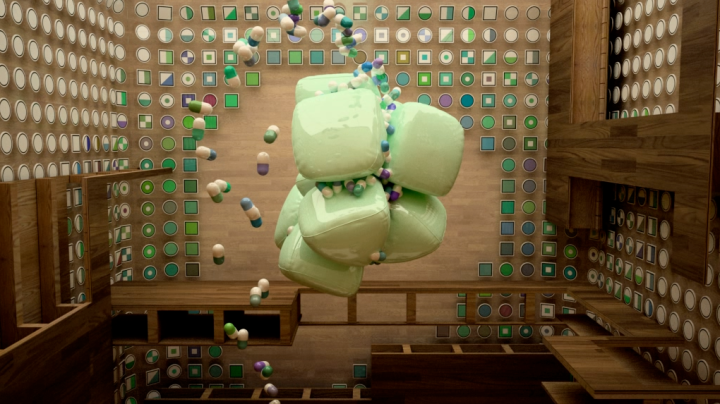
(Zeitguised - Perepetics)

was created in a game engine - and that several of the different components were hooked up to different parts of a song like a drum pattern or a bassline. Like I said, the possibilities would be endless. And beautiful.

Bookmark and Share

Tuesday, 7 April 2009

VDMX STRUCTURE

I came across this post in Create Digital Motion a while back called 'Structuring a VJ set' by Momo the monster. In it he explains to the viewer how he would go about creating various types of media that would run in different media sets - and be on specific layers- thus allowing more control over what is being displayed on screen. I had tried exactly the same method before (and assigning the clips to Ableton tracks) with a degree of success. The limitations were that movies being triggered in fast sequences would either run with a delay - or in the worst case, crash the machine.

Click on the shots of my set-up, the output, and what I was trying to achieve...

----------

1.

The first is a shot of Ableton, with a number of MIDI tracks, all sending signals out that can be read by VDMX. There are a couple of 'audio in' tracks for any incoming music that I want the visuals to sync with.

In the MIDI slots, I have a number of pre-made sequences that are sending signals out. What this set-up also allows for is creating sequences (and therefore visual patterns) on the fly - by using a MIDI keyboard, such as the M-Audio Oxygen8 that I have.

There are 12 MIDI slots in total - 2 for background patterns, 2 for drum patterns, 2 for percussion (or other random sound effect) patterns, 2 for bass patterns, and 4 more called 'Main' - which can contain main song patterns or live input - so it would literally like playing videos as a piano

----------

2.

The second shot is of VDMX - with 12 Media bins, linking back to the 12 MIDI slots that I have. From the shot you can see that there isn't much in the way of Media here, however They could be filled with large amounts of clips that can represent each sound or note - it is here however that the ambitious size of the project starts to enter pitfalls as literally trying to render out so many videos at such speeds uses up massive chunks of power. And thus crashes horribly.

----------

3.
This is a shot of the output window, displaying several layers of video - all reacting to MIDI.

----------

4.

And this is an Illustrator image of the kind of visuals scene I was trying to achieve...
Each of these elements would be linked to MIDI and thus react (changing shape, colour, or animating in an entirely different way) to each signal.

I'd like to try a set-up such as this on Modul8, just to check speeds and the ease of linking videos - though the Modul8 demo is, alas, quite limiting because of the lack of module support.

Thursday, 19 February 2009

M-NUS CONTAKT

Back in October last year I saw techno-legend Richie Hawtin playing at the Warehouse Project in Manchester, along with an amazing visuals set-up created specifically for the M-NUS tour. The show is all displayed on LED screens - far better than projection - and mixes VDMX, Quartz Composer and Processing into a mesmerizing display of simplistic forms.

videos of the tour can be seen here and here